Download button plugin
Redmine/ChiliProject has Files tab for publishing files for download. However it is not always clear that users should use this tab to find the project releases. That’s why the “Download” button plugin has been written.
This plugin adds nice and conspicuous button to the sidebar of the project. Users can use this button to download the recent file of the recent version. The plugin also allows specifying external URL for download, change caption and/or project name shown on the button, disable version or the whole button.
- The button is displayed and its configuration form is available, only when there is at least one closed version;
- If the button does not use external URL, there must be at least one file in the recent closed version;
- If the button uses a file and a user does not have access to it, the button will have caption “Authorize to download”.
Installation
To install this plugin do:
- For Redmine 2.x.x and above:
- Copy
downloaddirectory to#{RAILS_ROOT}/plugins. - Run:
rake redmine:plugins:migrate RAILS_ENV=production.
- Copy
- For older Redmine and ChiliProject:
- Copy
downloaddirectory to#{RAILS_ROOT}/vendor/plugins. - Run:
rake db:migrate:plugins RAILS_ENV=production.
- Copy
- Restart Redmine/ChiliProject.
Configuration
It’s possible to configure the “Download” button using the form available in the project settings menu:
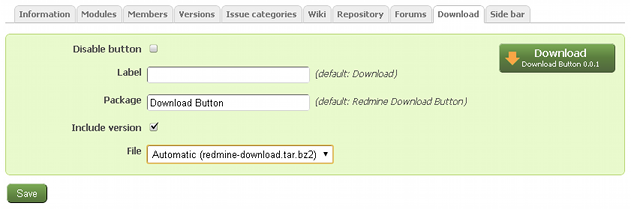
The “Download” tab is accessible only for users having the “Manage download button” permission.
Customization
It’s possible to customize the download button by creating custom.css file in the plugin’s assets/stylesheets directory and defining your CSS rules there.
Since version 0.0.3 the plugin also supports theming – theme’s style can be defined in file <theme>.css (e.g. red-andy.css).
Wiki extension
Since version 0.0.3 the plugin supports the !{{download}} Wiki macro. Check this page for details.